- Create a First-Person Perspective
- Viewfinders, Scopes & Binoculars
- Animate Focus, Position & Scale
- DSLR, Thermal & Night Vision Optics
- Customizable Heads-Up Displays
- Animate Scan Lines, Flicker & Roll
Optics
$39.00
All Ripple Training plugins sold through FxFactory. Learn more about FxFactory here.
Optics is a Final Cut Pro X plug-in that creates a first-person perspective through different sets of camera viewfinders, scopes and binoculars. Animate the focus, position and scale; add thermal and night vision effects, animate scan lines, flicker and roll. Control the HUD graphics of 4 popular DSLR camera types including f-stop, ISO, exposure values and more!
This plugin is delivered through a software called FxFactory. You can buy the tutorial directly by clicking the buy button, or try a free trial of the software by installing FxFactory and demoing the plugin.
Click here for Optics Help Movies.
FCP 10.5 and FxFactory 7.2.2 or later required for use on MacOS 11 (Big Sur)
FxFactory is a stand-alone application similar to the Mac App store for delivering and managing your plugins.
Using FxFactory you can download, install and test all plugins in trial mode free of charge before making a purchase.
During trial mode, all products are fully functional indefinitely, but will render a small watermark over your footage. FxFactory allows you to manage all your plugins in one place by allowing you to activate/deactivate just the plugins you want available within Final Cut Pro X (or other host application).
You also have the option to uninstall FxFactory and all of its products with a single click.
Here is a short list of benefits to using FxFactory:
– Consistent and reliable deployment/installation/purchasing/licensing of plugins.
– Consistent and reliable product removal/uninstall.
– Hassle-free updates. If a plugin has been updated it’s immediately available via FxFactory.
– Centralized efficient first level support for all products via FxFactory support system. https://fxfactory.com/support/
– One account for your licenses. If you buy multiple products they will all be linked to your FxFactory account and will automatically carry over to your other Macs. No need to track different serial numbers, download installers etc.
– Integrity checks on plugins. FxFactory ensures that plugins delivered via FxFactory are not tampered with and replaces them if they were changed or damaged. This allows for a consistent and reliable user experience.
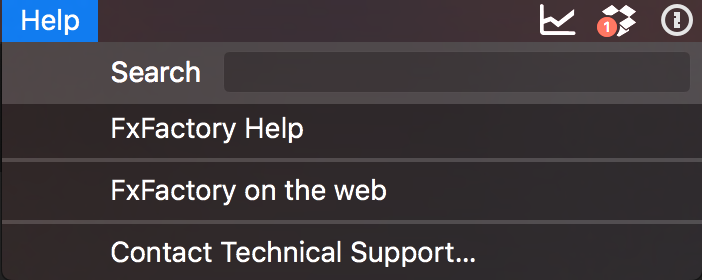
The best way is to launch FxFactory and choose Contact Technical Support from the Help menu.

Doing so sends your system profile to FxFactory so they can see exactly what version of FxFactory, MacOS and FCP X you are using.
You can also contact us at [email protected].
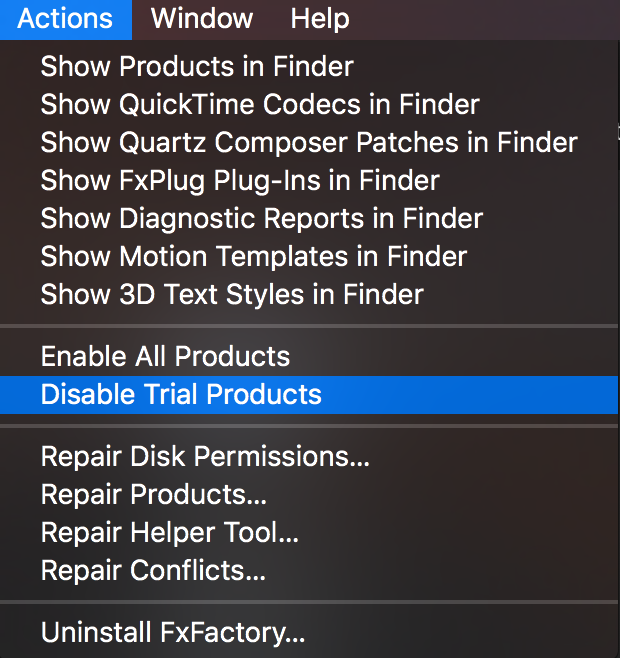
Launch FxFactory. From the Actions menu, choose Disable Trial Products:

Download the latest version of FxFactory:
http://fxfactory.com/download/
After installing, launch the FxFactory application and sign in with the same email you used during purchase. You may need to create a new password if you have not done so already. Once you login successfully, all products you purchased will appear inside the app.
After you have licensed the plugins, restart Final Cut Pro X and check if the watermarks are still there.
In Final Cut Pro X you may have to change one of the parameters of the plugin, forcing a change and re-render the clip.
If you have two machines you should purchase two licenses. You can purchase multiple licenses at once via the following link:
http://fxfactory.com/products/?method=web&type=commercial/
Contact [email protected] and inquire about volume license discounts which start at 10+ seats.
Yes – go to https://fxfactory.com/download/ and scroll down, you’ll see links for versions of FxFactory that are compatible with older Mac OS versions like Lion, Mavericks, and Yosemite. That said, we highly recommend using the latest OS for optimal plugin performance.
No, our plugins are designed to work exclusively in Final Cut Pro X. If there is a feature you’d like added, please contact us at [email protected].
About the Author: Steve Martin and Mark Spencer
1 review for Optics
Related products
-

Page load linkBullets
Ripple Bullets is a collection of 12 title plugins for Final Cut pro X which makes it easy to add animated bulleted lists over your video.$49.00
RT 360 Transitions
RT 360 Transitions are a set of 6 free Final Cut Pro transitions that were specifically designed to augment & enhance spherical videos.
Ripple Whips 3.0
Ripple Whips 3.0 is a set of dynamic, camera-driven, highly customizable transitions that add energy and fluidity to your cuts.Rated 4.90 out of 5$49.00We use cookies to enable the site's core functionalities. Please review our cookie policies in the Privacy Policy. DetailsThese cookies are required for the site to perform its core functionalities. This includes cookies allowing you to securely log-in and log-out and make an order through our online shop.First Party Cookies
These are cookies needed to optimize your experience on our website. This includes analytics cookies, cookies to run 3rd party services like videos, etc.Third Party Embeds
Go to Top

Max L. –
GREAT! IM HAPPY!